Proxy Web GUI inspector coming to rama CLI in 0.5
The rama binary is a network toolkit made with the rama (Rust) framework, which allows you to run certain diagnostic commands, make client web requests (including TUI support for interactive protocols such as websockets or rich response display for standards such as RSS) and also to run server and proxy services.
In fact, all rama public services run on fly.io using the dockerized version of the rama CLI binary.
Last week we added opt-in MITM capabilities to the rama serve proxy command (#1135), to allow you to inspect, replay, interact with and export network data and derived user agent profiles using a protected (web) GUI.
Rama CLI and the rama rust framework
About three years ago the rama CLI tool started as a demo of some of the capabilities of rama, the modular Rust framework. Later, some of these capabilities also became the underlying commands used to serve rama public services:
- https://ipv4.ramaproxy.org/: find your remote IPv4 address and its location information (txt/json/html)
- https://ipv6.ramaproxy.org/: same but for IPv6
- https://echo.ramaproxy.org/: echo back your request/input (e.g. HTTPS data and info)
- https://fp.ramaproxy.org/: fingerprinting service (also used as a collector for our embedded user agent profiles)
- https://http-test.ramaproxy.org/: HTTP test endpoints for all kinds of HTTP testing and diagnostic purposes
A bit later, we also added client capabilities allowing you to send HTTP(S) requests in a cURL-like CLI experience. Websocket support was added to this later on, and more recently we also gave that client command RSS support, for when the response is detected as such.
Diagnostics
As discussed and as you will see, the rama CLI binary is packed with commands that can aid with both your local and remote debugging. Next to its inherent capabilities it can also be a useful comparison tool alongside custom network stacks / projects built with rama (the framework).
It is possible that while building a network stack with rama you encounter issues. Perhaps you find out it is most likely a bug, but you are not sure whether it is a mistake in your own project or within rama code that you depend upon. In that scenario it can be useful to try to reproduce it with one of the rama CLI commands (client, server or proxy) against the same system you are operating with. If the issue reproduces you have confirmed there is most likely a bug in rama, or at least that it is not unique to your project. Attach that info when you reach out to us by mail, Discord or GitHub.
MITM Proxy
rama serve proxy --mitmThe proxy subcommand now has an optional --mitm flag. If it is given without an explicit interface it will use the same bind address as used for the proxy itself. This can however be configured using --mitm=<IP:PORT>. Once the proxy has started it will provide you via stderr with an auth link that you can use to enter the rama inspector, the (web) GUI. Of course for MITM proxies to work the client does need to trust the MITM proxy CA, and thus that can also be downloaded from the inspector itself, or written to disk up front with --mitm-ca-cert <PATH>.
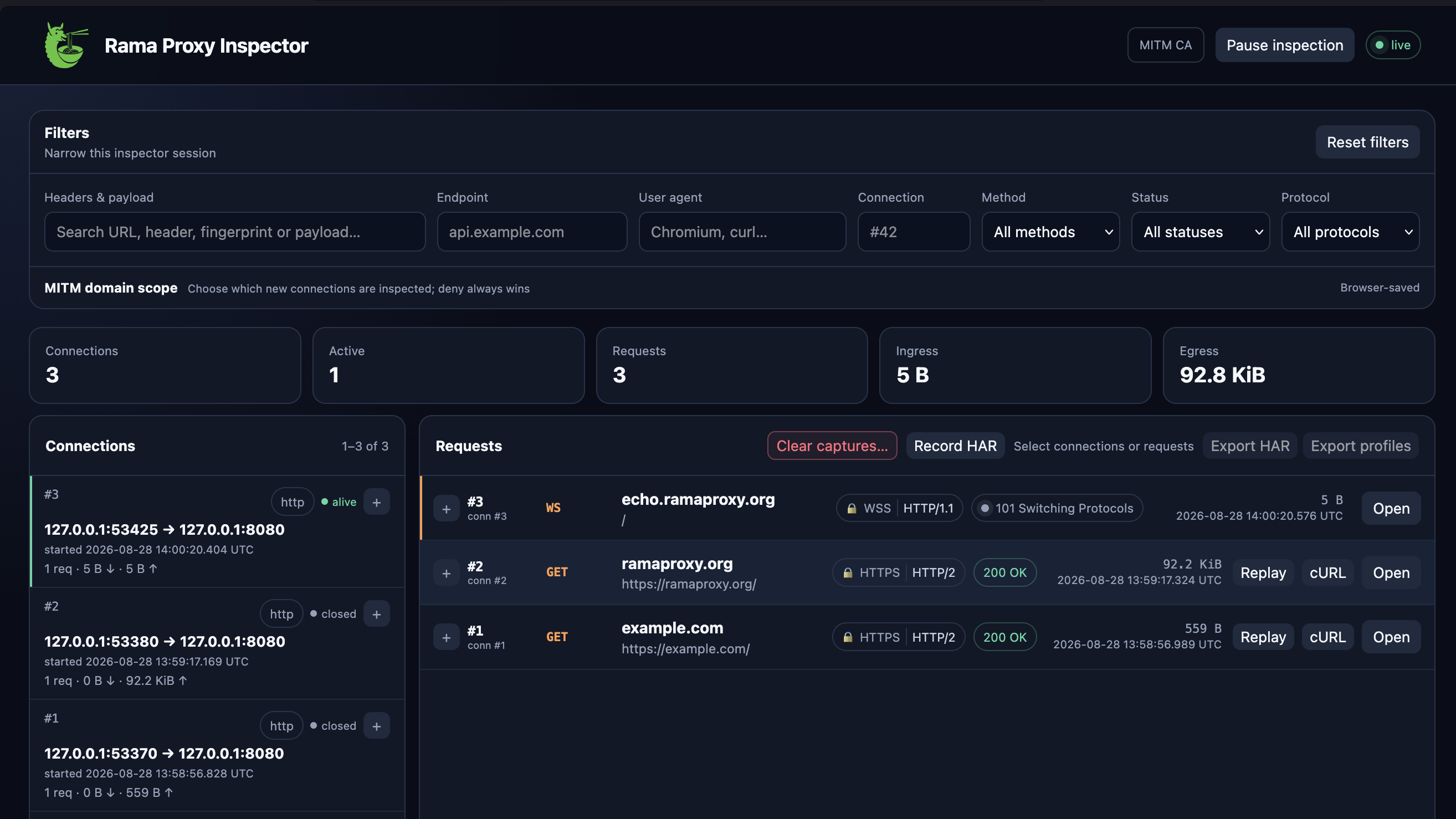
With the inspector open you will see incoming connections and requests. For each incoming connection you'll be able to export User Agent HTTP/TLS profiles — useful for UA emulation and fingerprinting — along with socket information and more. Application data transferred over these connections can also be inspected.
HTTP(S) connections for example will show information about the requests and responses transferred over these connections. You can inspect, replay and HAR/cURL export these. Protocols built on top of HTTP will also receive special handling where possible. Websockets are an example of such a supported protocol and for those you'll be able to see and replay messages transferred in either direction. You can even send custom messages.
Tip
This capability to export User Agent profiles for specific connections/requests is very useful in case you need specific User Agent profiles of any app or platform, for the purpose of User Agent Emulation (e.g. data extraction) or fingerprinting as part of your security posture. And all this without having to write any code yourself.
Simply configure the proxy (socks5/http) in your app or platform of choice, capture the network traffic for the flows you care about, and off you go.
ICAP
Starting from rama 0.5 we will also have support for ICAP, which stands for Internet Content Adaptation Protocol. It's a useful protocol that can be used as part of any HTTP-capable MITM proxy stack where you wish to inspect and possibly modify HTTP(S) traffic using an external service.
It allows you for example to inspect/scan malware within an isolated (remote) service, without exposing the risks that come with it to the (MITM) proxy itself.
The rama serve proxy command also supports ICAP using the --icap <URI> flag, allowing you to easily test out your own ICAP server, whether it is built with Rama or not. The other way around works just as well: rama serve icap gives you an ICAP echo service to point your own proxy stack at.
You can read more about ICAP in the rama book or check out the edge docs to start building with it today, with the http_icap_proxy example walking you through the full wiring, from plain HTTP to intercepted HTTPS traffic. Starting from rama 0.5 it will also be part of the official crates.io release.
Conclusion and ecosystem
Rama is first and foremost a modular network framework to build network services with Rust. It is there to empower you to build libraries, frameworks, plugins and executables that have a strong reliance on network technology. It is built for and with the community, and we invite everyone, including all those that read our blog articles, to be part of it.
The rama CLI binary tool is to be considered a useful network developer toolkit, both as an end user and as a developer building network code using the rama framework.
That said, we very much welcome others in the Rust ecosystem to build GUI, TUI and other forms of specialized network toolkits, built with Rama. In case you are the maintainer of such a tool that wishes to migrate your underlying network code to Rama or have an idea to build your own networking toolkit, be it a client, server, proxy or a combination thereof, using Rama, do feel free to reach out to us by mail, Discord or GitHub discussions. We'll gladly guide you where possible, and we'll happily list you in the rama ecosystem.
And as always, feedback is very much welcome, be it on our articles or Rama itself.